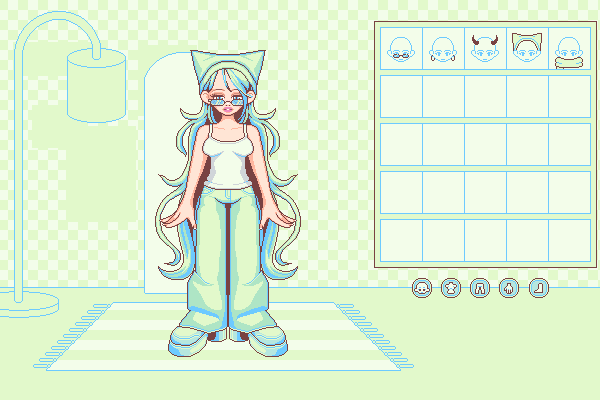
My page dedciated to the kisekae set system, also known as KiSS. It's an interesting piece of software mainly used for dress up games, but is capable of more than that! I'm still learning how to create my own games but will share my projects here as I progress ^.^
I recommend you start with the KiSS viewer downloads page at Otaku World. Then, head to their Doll Library to download some KiSS dolls in the form of .lzh files. Some dolls come with multiple sets of wardrobes, which can be toggled layer by layer in the UI. Some are simple drag-and-drop doll makers, and others will have more interactive elements.
Head to the Otaku World Tutorials page to find more in depth tutorials!
This is just my process for making KiSS dolls in 2026. You will probably have to run things in compatibility mode. KiSS dolls are shared in the .lzh format, which is a compressed set of files - .cel, .kcf, .cnf, and can include .wav files. A .cel file is made of a .bmp image, a palette, and information about behavior and coordinates. The configuration file that declares all the .cels and functions is the .cnf file, this is where the programming is done. You also need a palette, which comes in the form of .kcf files and are made from a .bmp image.
To get started, you'll need a KiSS viewer and a KiSS maker. The ones I use are Direct KiSS Viewer and the KiSS cel WorkShop 2. When you create your assets - the doll base, clothes, color variations, blinking animations, etc, keep in mind they gotta be .bmp files. For transparent backgrounds, the palette usually uses the first top left pixel in your image.
Import your bmp image into KiSS cel WorkShop 2. Go to Tools > Pick Mask Color > select your color. This way you don't need to convert to only 256 colors. This makes your cel's color profile 'CKiSS', and I find it a bit easier to work with lmao ;-;.
You can go to Tools > Cnf Editor, but it's not necessary imo. You can open up notepad and write it that way too! I recommend checking out documentation here.
Each .cnf file starts with these declarations:
%palette.kcf (or whatever your palette name is)
(640,400) (the size of your canvas)
Then, you declare your cel files:
#1 hair1.cel
#0 doll.cel
#1 hair2.cel
#2 bg.cel
Notice how hair1.cel and hair2.cel are both #1? This makes them move as a group, and because doll.cel is inbetween, this group acts like the front & back hair.
...
After creating your .cnf file, you can open it up in the Direct KiSS Viewer. For troubleshooting, I would recommend reading this.
Here is where you can easily set cel coordinates and save them directly to the cel. You will probably need to switch back & forth between your cnf file, the direct viewer, and the cel editor as you work on your doll.
(wip)
work in progress ~
notes on making my own kiss doll: